

Creating a strong password along with Multi-Factor Authentication(MFA) is one of the strongest actions you can take to protect your online accounts. Bad actors use password-stealing practices to gain access to your digital life. If you don’t update your passwords, any past database hacks could continue to expose your personal information.
The strongest password:
- Is unique for every site
- Gets changed regularly (90 Days)
- Has a combination of upper and lowercase letters, numbers, and symbols
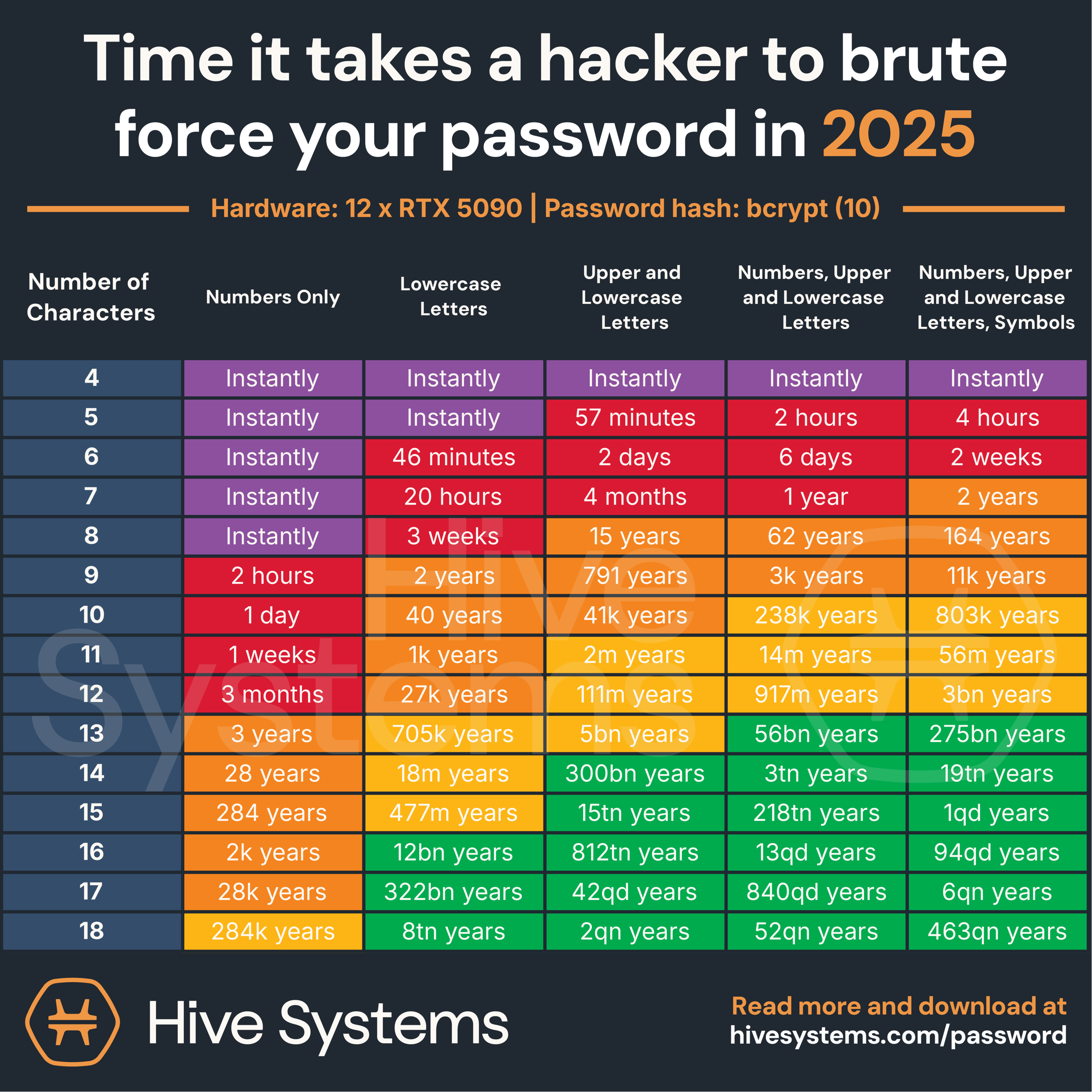
- Is at least 13 characters long
When you enable Multi-Factor Authentication (sometimes called Two-Factor Authentication) you verify your identity on another device, usually a code sent to your phone. With this extra layer of verification, even if hackers get your password, they wouldn’t get into your account or device. Biometrics (fingerprint or facial recognition) is another layer of enhanced security available on certain devices. Some companies are using Knowledge-Based Authentication as an extra layer of security, requiring users to answer personal questions before getting into accounts.
Remembering your passwords can be difficult, that’s why you may consider using a password manager. Password managers are apps that generate and store your usernames and passwords, requiring a “master password” to access your list. The login information is stored in an encrypted database.
Action Steps:
1. Update your Passwords to meet the criteria in the chart
2. Use Multi-Factor Authentication whenever possible
3. Consider Using a Password Manager
4. If you have a device that allows biometrics, enable it
Hive Systems, Password Table www.hivesystems.com/password
NYT, Best Password Managers https://www.nytimes.com/wirecutter/reviews/best-password-managers/

Action Steps:
1. Verify the sender’s email address, not just display name. Logos and graphics can be spoofed.
2. Don’t click the links in the message to login! Use your browser to type the website address to login to your account.
3. If it looks suspicious or you didn’t expect the email, call to verify. Don’t open attachments you were not expecting.
4. Use Multi-Factor Authentication whenever possible.

Software updates can seem unimportant, and it is tempting to click “Update Later” but these updates are an important part of digital security. Out-of-date software leaves you exposed to risks. As soon as software is released, hackers start to look for vulnerabilities. Installing updates can close these dangerous weakness. According to the US Government Cybersecurity and Infrastructure Security Agency (CISA), “The best defense against attackers exploiting patched vulnerabilities is simple: keep your software up to date. This is the most effective measure you can take to protect your computer, phone, and other digital devices.”
Digital vigilance doesn’t end when you leave your house, most of us go everywhere with our phones. When your phone does “everything” it becomes a target for hackers. Wi-Fi networks, Bluetooth, and charging ports can create exposures.
Action Steps:
1. Don’t post on social media about your vacation while you are gone, wait until you get home. Don’t advertise when your house is empty.
2. Don’t use public Wi-Fi. Hackers can use it as a connection to access your device. Instead, use a hotspot (through your phone provider) or VPN (Virtual Private Network, a service that creates a secure connection over the internet).
3. Adjust your phone settings to not automatically connect to nearby Wi-Fi.
4. If you need to charge your phone, tablet, computer, or any other USB device, use a cable and charger brick to plug into a standard wall outlet, don’t plug into a public or unknown USB port.
5.Turn off Bluetooth when not in use and unpair your phone from any unused devices (such as a rental car).


Action Steps:
1. Think before you post on Social Media platforms. Less personal information in your profile is better and consider limiting who can see your profile to “friends only”.
2. Don’t assume anything you share with AI is private.